


Introduction
How to Fix Slow MySQL Queries, MySQL is one of the most widely used relational database management systems in the world. From small business websites to enterprise-level applications, MySQL powers countless online platforms that rely on fast and efficient data retrieval. However, as databases grow and traffic increases, slow MySQL queries can become a major performance bottleneck.
A slow query can negatively impact user experience, increase server load, and reduce overall application performance. Pages may take longer to load, reports may generate slowly, and applications can become unresponsive during peak traffic periods. Fortunately, most MySQL performance issues can be identified and resolved with the right optimization techniques.
In this guide, we will explore how to fix slow MySQL queries, identify common causes of poor performance, and implement best practices that can significantly improve database speed and efficiency.
Understanding Slow MySQL Queries
Before fixing slow queries, it is important to understand what makes a query slow in the first place. A MySQL query becomes slow when it takes longer than expected to retrieve, process, or return data from the database.
Several factors can contribute to poor query performance. These include missing indexes, inefficient SQL statements, large datasets, poorly designed database structures, and hardware limitations. Even a simple query can become slow if the database engine must scan millions of rows to find matching records.
As databases continue growing, performance problems often become more noticeable. Queries that once executed in milliseconds may begin taking several seconds or even minutes. This is why proactive database optimization is essential for long-term scalability.
Understanding the root cause of slow queries is the first step toward implementing effective solutions.
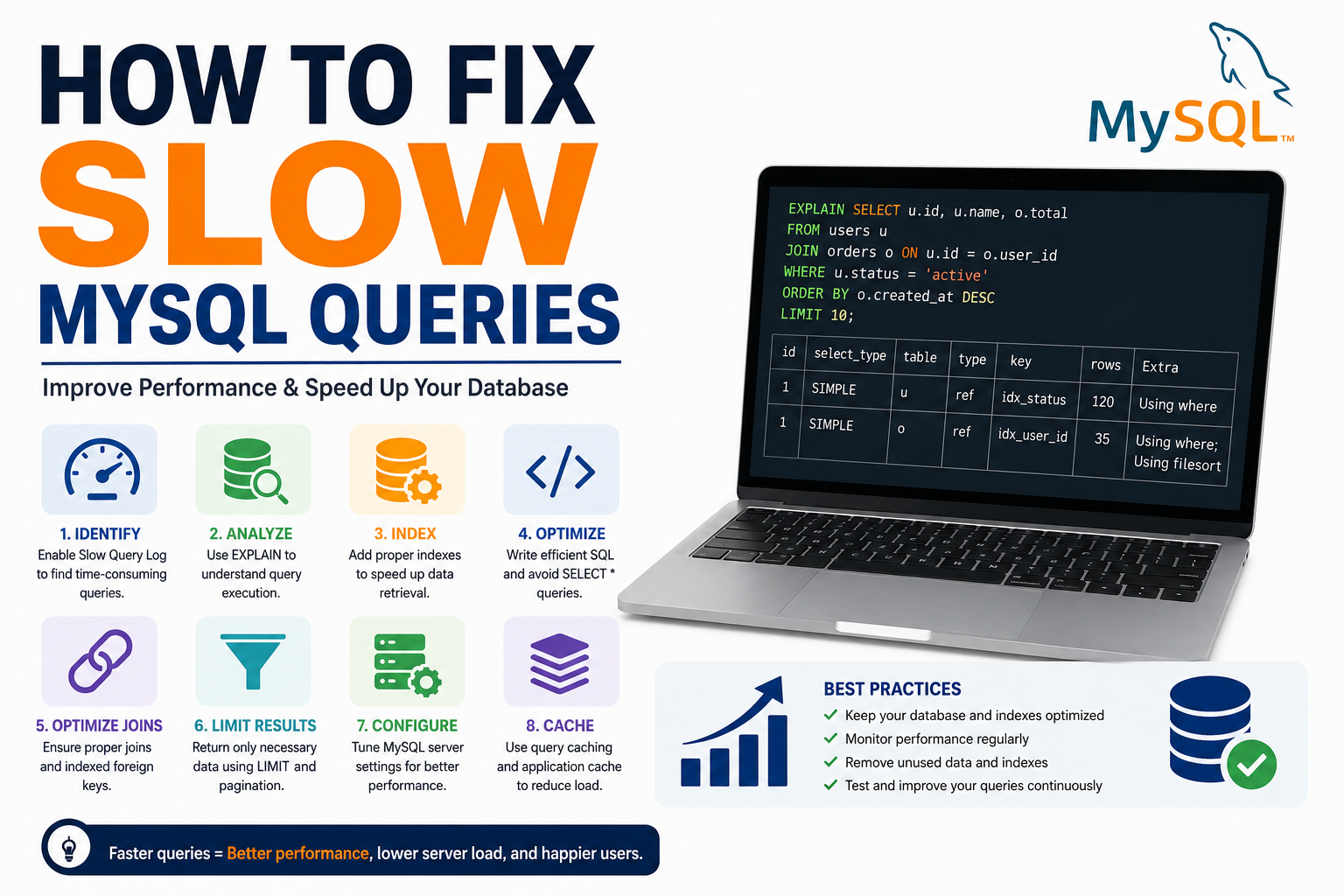
Use the MySQL Slow Query Log
How to Fix Slow MySQL Queries, One of the most valuable tools for identifying performance issues is the MySQL Slow Query Log. This feature records queries that exceed a specified execution time threshold.
By enabling the slow query log, database administrators can identify which SQL statements are consuming excessive resources. Instead of guessing which queries are causing problems, you gain access to actual performance data.
The log provides detailed information about execution times, lock durations, and query frequency. This information helps prioritize optimization efforts and focus on the most problematic areas.
Regularly reviewing the slow query log should be part of every database maintenance strategy. It offers insights that can dramatically improve troubleshooting efficiency.
Optimize Database Indexes
How to Fix Slow MySQL Queries, Indexes are one of the most powerful tools for improving MySQL performance. Without indexes, MySQL may need to scan entire tables to locate matching records, which becomes increasingly inefficient as data volume grows.
An index acts like a book’s table of contents. Instead of reading every page to find information, MySQL can quickly locate the required data through indexed columns.
When optimizing indexes, focus on columns frequently used in WHERE clauses, JOIN conditions, ORDER BY statements, and GROUP BY operations. Proper indexing can reduce query execution times dramatically.
However, adding too many indexes can also create performance issues. Every index requires storage space and increases the workload for INSERT, UPDATE, and DELETE operations. The goal is to create a balanced indexing strategy that supports both read and write performance.
Analyze Queries Using EXPLAIN
The EXPLAIN command is one of the most important tools available for query optimization. It allows developers to see exactly how MySQL processes a query before execution.
When running EXPLAIN on a query, MySQL provides information about table access methods, index usage, estimated row counts, and join operations. This visibility makes it easier to identify inefficiencies.
For example, if EXPLAIN reveals a full table scan instead of an index lookup, it may indicate that an important index is missing. Similarly, excessive row scanning often points to inefficient query design.
Understanding execution plans helps developers make informed optimization decisions rather than relying on trial and error.
Avoid Using SELECT *
Many developers use SELECT * during development because it is convenient. However, in production environments, this practice can negatively affect performance.
SELECT * retrieves every column from a table, even when only a few columns are actually needed. This increases data transfer, memory usage, and processing overhead.
Instead, explicitly specify the columns required by the application. Retrieving only necessary data reduces resource consumption and improves query efficiency.
This optimization becomes especially important when working with large tables containing numerous columns or large text fields.
Small improvements like this may seem insignificant individually, but they can produce substantial performance gains at scale.
Optimize JOIN Operations
JOIN statements are essential for relational databases, but poorly optimized joins can significantly slow down query execution.
Complex joins involving multiple large tables often require extensive processing. Without proper indexing, MySQL may perform expensive table scans and sorting operations.
To improve join performance, ensure that join columns are indexed appropriately. Additionally, avoid joining unnecessary tables and retrieve only the data required for the specific operation.
Simplifying join logic whenever possible can reduce execution times and lower server resource usage. Efficient joins are critical for maintaining high-performance applications.
Database normalization remains important, but excessive complexity should be avoided when designing relationships between tables.
Limit the Number of Returned Rows
Returning excessive amounts of data can slow down both database performance and application response times.
If a query retrieves thousands or millions of records when only a small subset is needed, valuable resources are wasted. Large result sets require additional processing, memory allocation, and network bandwidth.
Using LIMIT clauses allows applications to retrieve manageable portions of data. Pagination is a common technique that improves performance while enhancing user experience.
For example, displaying 20 records per page instead of loading thousands at once significantly reduces query execution costs.
Carefully controlling result sizes helps maintain responsiveness and scalability.
Improve Database Structure
A poorly designed database schema often contributes to slow query performance. Even well-written SQL statements may struggle when the underlying structure is inefficient.
Normalization helps eliminate redundancy and improve data consistency. However, excessive normalization can sometimes lead to complicated joins and slower query execution.
Database designers should aim for a balance between normalization and practical performance requirements. Strategic denormalization may be beneficial in high-performance environments.
Regularly reviewing database architecture ensures that schema design continues supporting application growth and evolving business requirements.
Good database design forms the foundation of long-term performance optimization.
Optimize Server Configuration
Database performance is not determined solely by query design. Server configuration also plays a significant role.
MySQL includes numerous configuration parameters that influence memory allocation, caching behavior, connection management, and disk operations. Incorrect settings can limit performance even when queries are well optimized.
Key areas to review include buffer pool size, query cache settings, temporary table configurations, and connection limits. Proper tuning allows MySQL to utilize available hardware resources more effectively.
Performance monitoring tools can help identify configuration bottlenecks and guide optimization efforts.
Regular tuning becomes increasingly important as traffic and database workloads grow.
Use Query Caching and Application Caching
Repeatedly executing identical queries can place unnecessary strain on the database server.
Caching helps reduce this burden by storing frequently requested data in memory. Instead of querying the database repeatedly, applications can retrieve cached results instantly.
Modern applications often implement caching layers using technologies such as Redis or Memcached. These systems dramatically reduce database workload while improving response times.
Application-level caching is particularly effective for frequently accessed content that changes infrequently.
Combining efficient SQL optimization with intelligent caching strategies often delivers the best performance improvements.
Monitor and Maintain Your Database Regularly
Database optimization is not a one-time task. As applications evolve, new performance challenges emerge.
Regular monitoring helps identify problems before they affect users. Performance metrics such as query execution times, CPU utilization, memory consumption, and disk activity provide valuable insights.
Routine maintenance tasks include updating statistics, rebuilding indexes when necessary, removing unused data, and reviewing slow query reports.
Proactive maintenance ensures that databases remain efficient even as data volumes increase and workloads change.
Organizations that prioritize ongoing optimization often experience fewer outages, better scalability, and improved user satisfaction.
Common Mistakes That Cause Slow MySQL Queries
Many performance problems stem from avoidable mistakes. One common issue is failing to create indexes on frequently searched columns. This forces MySQL to perform expensive table scans.
Another mistake involves retrieving more data than necessary. Large result sets increase processing overhead and slow application performance.
Developers also sometimes write overly complex queries containing nested subqueries that could be simplified. Simplified query structures often execute much faster.
Ignoring database maintenance is another major cause of performance degradation. Databases require ongoing monitoring and optimization to remain efficient over time.
Recognizing these common pitfalls can help prevent many performance issues before they occur.
How to Fix Slow MySQL Queries by Optimizing Database Tables
One of the most overlooked methods when learning How to Fix Slow MySQL Queries is database table optimization. Over time, tables can become fragmented due to frequent INSERT, UPDATE, and DELETE operations. This fragmentation can increase disk usage and force MySQL to work harder when retrieving data.
If you are serious about understanding How to Fix Slow MySQL Queries, regularly optimizing your tables should be part of your maintenance routine. The OPTIMIZE TABLE command reorganizes table data and indexes, helping improve query execution speed. For websites and applications that handle large amounts of data, this simple maintenance task can provide noticeable performance improvements.
Another important aspect of How to Fix Slow MySQL Queries is removing unnecessary or outdated data. Large tables with millions of records often contain information that is no longer needed. Archiving old records and cleaning unused data reduces table size and allows MySQL to process queries more efficiently.
Database optimization should not be viewed as a one-time task. Businesses that continuously monitor and maintain their databases typically experience faster query execution, lower server load, and improved application performance. If your goal is to master How to Fix Slow MySQL Queries, combining table optimization with indexing, query analysis, and caching strategies will produce the best results.
Finally, remember that How to Fix Slow MySQL Queries is not just about writing better SQL statements. A well-maintained database structure is equally important. Optimized tables, efficient storage engines, and regular maintenance can significantly enhance overall database performance and ensure your applications remain fast as they continue to grow.
Conclusion
Learning how to fix slow MySQL queries is essential for maintaining fast, scalable, and reliable applications. Query performance directly affects user experience, server efficiency, and overall business success.
By enabling the slow query log, optimizing indexes, analyzing execution plans, improving joins, limiting returned data, and implementing caching strategies, developers can dramatically improve database performance.
Database optimization should be viewed as an ongoing process rather than a one-time project. As applications grow and data volumes increase, continuous monitoring and refinement become increasingly important.
Organizations that invest time in proper MySQL optimization benefit from faster websites, happier users, lower infrastructure costs, and improved long-term scalability. With the right techniques and consistent maintenance, even large databases can deliver exceptional performance.